The short answer
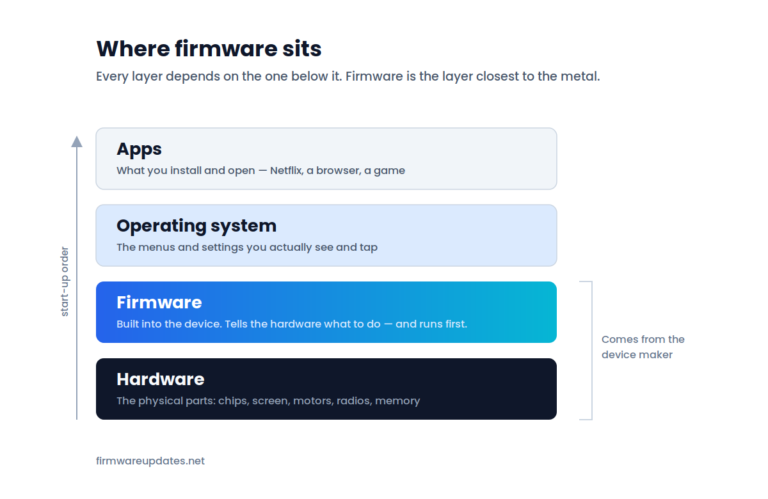
Firmware is a type of software — the type that is built into a device to control its hardware directly. Ordinary software runs on top of that, and you install and remove it yourself. Hardware is the physical object all of it runs on. Same family, three different jobs.
The confusing part is that firmware is not the opposite of software; it is a subset of it. So “firmware vs software” is really a question about which kind of software you are dealing with — and the answer changes what you can do to it, who is responsible for fixing it, and how much risk is involved in updating it.
The difference at a glance
|
|
Hardware |
Firmware |
Software |
|---|---|---|---|
|
Where it lives |
The physical object |
A chip inside the device |
Storage, on top of an operating system |
|
Who puts it there |
The manufacturer, at the factory |
The manufacturer, at the factory |
You, or whoever set the device up |
|
How it changes |
It doesn’t — you replace the part |
A firmware update, rewriting the chip |
Install, update or delete, any time |
|
Examples |
Screen, processor, motor, antenna |
BIOS, router firmware, earbud firmware |
Netflix, Chrome, a phone game |
|
Without it |
Nothing to run anything on |
The device will not start at all |
Device works fine, that feature is missing |
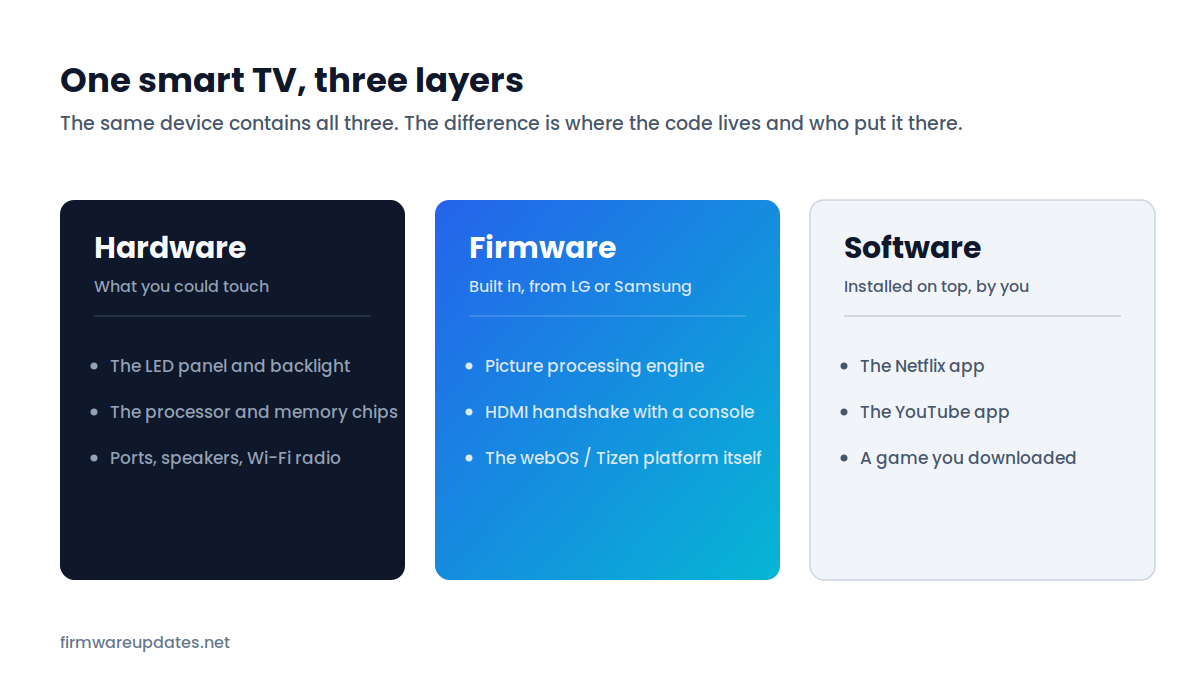
What counts as software
Software is the umbrella term for every set of instructions a device can run. Under that umbrella sit the operating system, the apps you install, the drivers on your computer — and firmware.
In everyday speech, though, “software” has narrowed to mean the part you interact with and control: the apps, the programs, the things with icons. That is the sense most people mean when they ask how it differs from firmware, and it is a useful working definition as long as you remember it is a habit of language, not a technical rule.
Manufacturers do not help. LG calls its TV firmware a “software update”. Sony calls the PS5’s firmware “system software”. Samsung uses both words on the same support page. When a device says “software update”, check whether it means the platform underneath or an app on top — the answer determines how carefully you need to treat it.
What makes firmware different
Three properties separate firmware from the software you are used to installing.
It is tied to one specific piece of hardware
Chrome runs on any computer. A router’s firmware runs on that model of router and nothing else — often not even on the same model with a different hardware revision, which is why manufacturers publish separate files for “v1” and “v2” of a product that looks identical in the box. Firmware is written against the exact components in front of it.
It persists through things that wipe everything else
A factory reset clears your settings, accounts and installed apps — and leaves the firmware version untouched. Reinstalling Windows does not change your motherboard’s BIOS. Wiping a phone does not roll back its modem firmware. Firmware sits on its own chip, below the storage that gets erased.
You cannot simply uninstall it
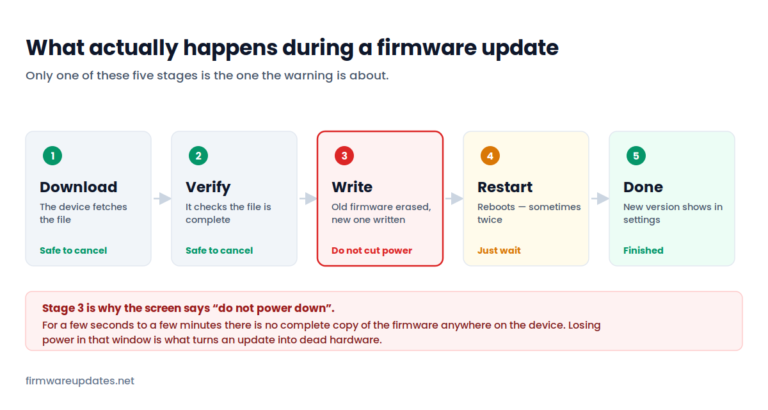
There is no remove button. The only way to change firmware is to overwrite it with another version — which is exactly what a firmware update does, and why the process is more delicate than installing an app. There is no partially-installed state to fall back to; the chip either holds working firmware or it does not. Our full explanation of what firmware is goes deeper into why that matters.
Where hardware fits in
Hardware is the part you can drop. Everything else on this page is instructions — patterns of electrical charge that tell the hardware what to do. The distinction people actually need is not philosophical, it is practical: hardware problems need a repair or a replacement; software and firmware problems can often be fixed with a download.
That is the first question worth asking when a device misbehaves. A TV with a cracked panel or a dead backlight is a hardware problem, and no update will help. A TV that has stopped talking to your soundbar over HDMI is almost certainly firmware, and an update might fix it in five minutes. Same symptom category, completely different afternoon.
Quick test: firmware or software?
Six real cases. Have a guess before you open each one.
Why the difference matters when you update
This is the practical payoff, and it is the reason it is worth knowing which one you are looking at.
Updating an app is close to risk-free. If it goes wrong you delete it and install it again, and nothing else on the device notices. Updating firmware is different in kind: the device is rewriting the code that starts it. Interrupt that — a power cut, an unplugged cable, an impatient hand on the switch — and you can be left with hardware that no longer boots. It is not a common outcome, but it is a possible one, and it is not possible at all with an app.
The other asymmetry: firmware is harder to undo
An app you dislike can be rolled back or replaced in a minute. A firmware update often cannot be reversed at all — manufacturers frequently block downgrades, and the ones that are possible are fiddly. If an update is going to change something you rely on, you generally get one chance to decide. That is why our device guides tell you what an update contains before they tell you how to install it.
None of this means firmware updates should be avoided — security patches for routers in particular are worth installing promptly. It means they deserve a minute of attention that an app update does not. We walk through the real risks, and the handful of situations where waiting is smarter, in is it safe to update firmware?
Frequently asked questions
Related: what is firmware? · firmware vs driver · how to check your firmware version. All of our explainers live in Firmware Basics.